Call-outs, covered
When a caregiver can’t make a visit, Looper offers it to the people who can take it, best match first: in the app, by text or with a phone call. The first to say yes gets the visit. Your team steps in only if nobody does.
From call-out to covered
Set it up once with a sentence. After that, every call-out follows the same steps.
- 1
A caregiver calls out
From the caregiver app, by asking Looper, or on the phone. They come off the visit and your schedulers are told right away.
- 2
Your loop hands it to Looper
The Cover call-outs loop gives Looper a task for the open visit, with the steps your agency chose.
- 3
Looper reaches out in waves
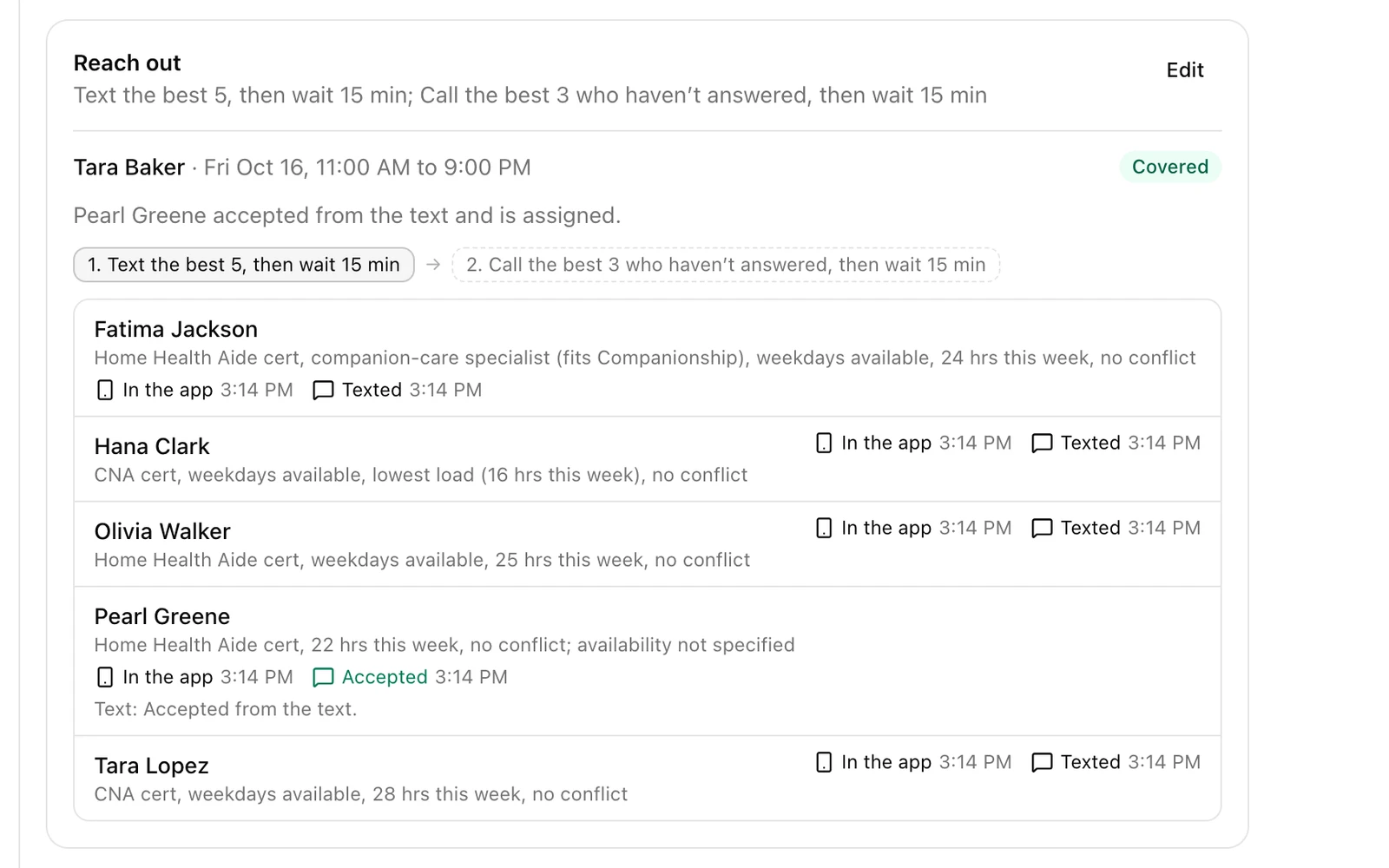
It ranks who can take the visit and offers it in steps, like texting the best five, then calling the ones who haven’t answered 15 minutes later.
- 4
The first yes gets the visit
It lands on their schedule and in their app, and every other offer closes. Looper reports back on the task for your review.
Three ways to say yes
Caregivers answer however they’re used to. Texts and calls come from your agency, by name.
- In the app
- Every step offers the visit in the caregiver app, with a notification and a spot on the Job Board.
- By text
- A text with a link to the visit. The caregiver signs in and taps Accept, no app needed.
- With a phone call
- For people who don’t check their texts. Looper says who is calling, describes the visit, answers questions, and they press 1 to accept.
Only people who can actually take it
Looper starts from the caregivers your schedulers would pick: free at that time, qualified, right for the client and not going into overtime. Careswitch checks again the moment someone says yes, so a visit never lands on a person who just picked up another shift. Each call-out gets its own task, so you can follow every offer as it goes out.
Your agency’s rules
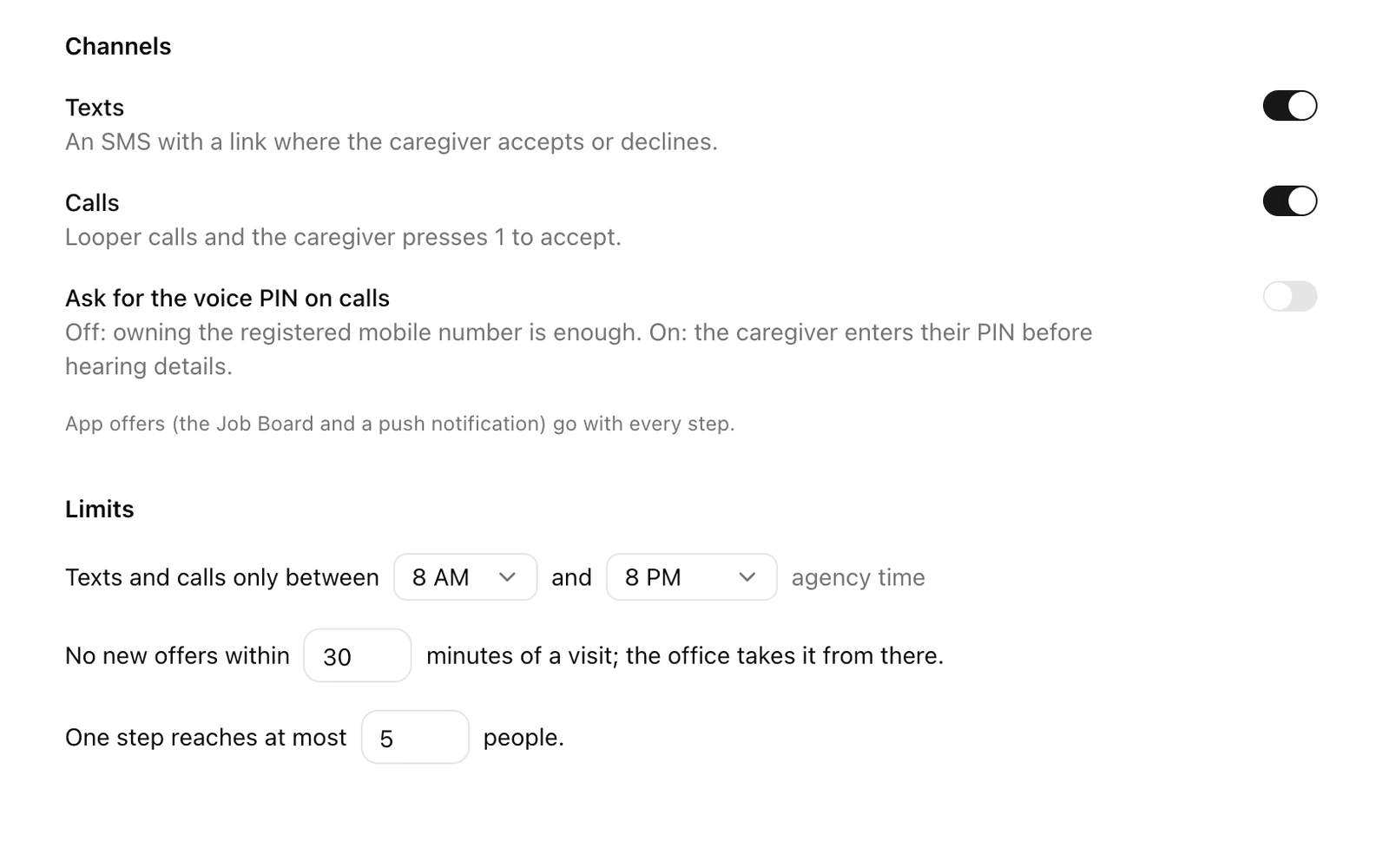
Admins set the limits once. No loop and no request to Looper can go past them.
- Texts, calls or both
- Turn each channel on or off for the whole agency.
- Contact hours
- Nobody gets a text or a call outside the hours you set.
- A cut-off before the visit
- Close to the start, Looper stops offering and the office takes it.
- How many at once
- Cap how many people one step reaches.
- Caregivers choose too
- Anyone can turn texts or calls off for themselves. Calls never share the client’s last name or address until the visit is theirs.
Part of your schedule, not bolted on
Coverage tools usually sit on top of your scheduling software, reading it through an integration and writing back what they can. In Careswitch, the call-out, the offers and the schedule are one system, so nothing waits on a sync.
- The visit is on the schedule and in the caregiver’s app the moment they accept.
- Overtime is checked against the hours already on their schedule this week, not a nightly export.
- Clock-in, payroll and the client’s invoice run on that same visit. Nobody re-enters it.
- Every offer, text, call and answer is saved on the task, next to Looper’s report.
Call-outs are one loop. Build the rest the same way.
A loop is work that runs on its own when something happens or on a schedule. Describe it in a sentence and Looper sets it up.
When a caregiver calls out
Find coverage: text the best five matches, then call the best three who haven’t answered, and ask me if nobody accepts.
When a client is added
Give the care manager a welcome call task, due the next day.
When a claim is rejected
Have Looper find out why and what to fix before it goes back out.
When a caregiver is hired
Give HR a task to finish the onboarding paperwork before the first visit.
Every Friday at 4 PM
Review unsigned timesheets for the week and flag visits missing a clock-out.
Every weekday morning
List caregivers heading into overtime this week, with the visits that would push them over.
Looper also works your tasks, writes alongside you in documents, and answers questions with your agency’s numbers.
Questions agencies ask
- Do caregivers need the app?
- No. Texts and calls reach anyone with a US mobile number on file who hasn’t turned them off. Caregivers with the app also get the offer there.
- Who gets offered the visit first?
- Looper ranks the people your schedulers could assign: free at that time, qualified, not excluded by the client, and not going into overtime. The best matches hear first.
- What if nobody says yes?
- When the last step runs out, the task comes back to the person you chose with who was contacted, what they said, and who Looper would try next.
- Can we change the steps?
- Yes. Describe them when you set up the loop (“text the best three, then call”), change your usual steps in settings, or edit them on one task.
- Does Looper ever assign someone on its own?
- Only the caregiver who accepts gets the visit, and only after Careswitch checks again that they are still free and won’t go into overtime.
- Does it work with our current scheduling software?
- Call-out coverage is part of Careswitch, which runs your schedule, billing and payroll. Our team moves your clients, caregivers and schedules over from the software you use today.